Features
Purchase now - Register later: A new way to register! Cel-Fi now have an app to register at time of installation! See the How to Register tab for more information.
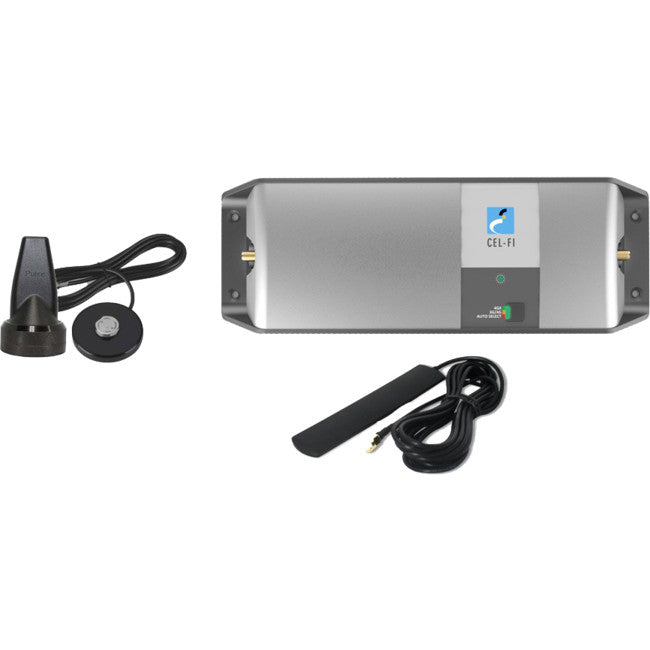
RPRCF00105 - Cel-Fi GO for Telstra Smart Repeater
The Cel-Fi GO for Telstra Smart Repeater is the ideal product to boost and distribute a 3G/4G mobile signal withinyour car, 4WD, or truck.
Supporting voice and mobile internet for multiple mobile devices, dropped calls and slow internet are a thing of the past.

PACK INCLUDES:
- Cel-Fi GO Mobile Model
- Pulse Magnetic Low Shadow Base Antenna with 3.5m cable
- Indoor Panel Antenna with 3m cable
- 12v Cigarette Lighter DC 5m Lead
FEATURES
- Designed for vehicles and moving transport applications
- 70dB of system gain
- Includes external and internal antennas
- Locked to Telstra's Mobile Network
- Carrier approved
- Band Selection Button
CELFI Set Up

How to Register
Telstra GO and PRO customers can now register using the Cel-Fi WAVE smart phone App.
What this means for you?
Customers are no longer required to complete the online registration on the Cel-Fi website, however when they receive a Cel-Fi it will require registration using the WAVE App to activate.
Why App registration?
- Removes the need to complete the registration form each time you order
- It will also be a requirement from the operators to assist in knowing more accurately where Cel-Fi’s are located on their network.
- Will assist in supporting customers, by enabling tech support to see more information about the Cel-Fi through the WAVE app portal.
How do you, the customer, activate the unit?
- Download the WAVE App from the Apple or Android store
- Run the App next to the Cel-Fi and it will connectvia Bluetooth
- For the GO: Power up GO and connect using WAVE Appto register
- For the PRO: Power up both the network and coverage unit and establish the link between the boxes. Then connect using the WAVE App to register
- Once connected it will pop up with the registration form to complete. Note this form is much shorter than the original web-based form
- Complete and submit the form
- The unit will now be active within 30 seconds
IMPORTANT: Internet access is required to run the WAVE app
Read more about the Cel-Fi Wave app at the Cel-Fi website.
Please Note: Online stock only for this item. Shipping at checkout for this item may be an estimate only and may apply only to some metro areas or to a specific distance from supply location. Local pickup may be available on some items by prior arrangement. Shipping charges may still apply for this item for Click and collect in store orders as this item may still need to be shipped to us for collection from the local pickup location.
Please use the contact us form to get an accurate shipping quote based on your order quantity and location to avoid order cancellation charges.